LIMITED LAUNCH PRICE — Save 73% Today Only 00h 00m 00s
The Professional Shortcut Reference for Alias Modelers

All 200+ Alias Shortcuts
organized command by command
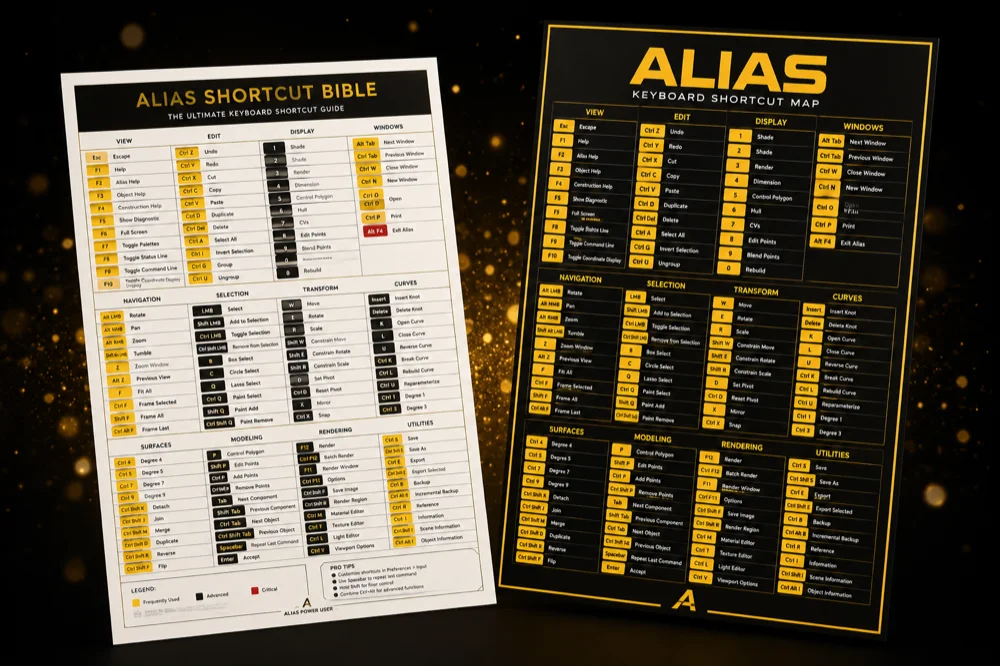
Alias Shortcut Bible — PDF guide and A3 poster
Instant Download
🖥️ Alias 2024 · 2025 · 2026
🔒 Secure Checkout

Detailed and easy-to-read explanations for every single shortcut in Alias Surface, AutoStudio, Concept & Design — so you stop hunting through menus and start modeling like the senior designers at OEM studios. For just $12.

$44 — 73% OFF launch price
$12
One-time payment · Lifetime access · No subscription
🔒 Stripe checkout 💳 Visa · Mastercard · PayPal ↩ 7-day refund
// PAGE 03 — CURVES
CURVE TOOLS
workflow-grouped
CREATION
New Curve CVC
New Curve EP⇧+C
CircleO
Arc 3-Point⇧+O
EDITING
Insert Edit Pt⌃+E
Curve FilletF
Curve BlendB
// PAGE 07 — SURFACES
SURFACE TOOLS
Class-A workflow
CREATION
SquareS
Skin⇧+S
Birail⌃+B
LoftL
DIAGNOSTICS
ZebraZ
Curvature⇧+Z
Cross-SectionX

A fully illustrated and organized cheat sheet
built for surface designers

Stop losing time. Start modeling at professional speed.

Find any command in 3 seconds — guaranteed
🎯 Workflow-grouped, not alphabetical like every other doc
🖨️ Print-ready A3 poster included for your workstation
🎨 Color-coded by category for instant visual scanning
200+
Shortcuts Covered
14
Pages Illustrated
3x
Alias Versions

Starting today, model in Alias without ever hunting through menus again.
No more wasted hours.

🎓
Land Your First Studio Job
Students and juniors who need to demonstrate fluency in Alias for portfolio reviews and interviews at OEM studios.
⚙️
Switch from Rhino / SolidWorks
Designers migrating from other software who keep getting lost in Alias's massive menu structure and unfamiliar commands.
🚀
Model 5x Faster Every Day
Working designers who lose hours each week clicking through menus instead of using the hotkeys senior modelers use.
★ WHAT YOU'LL RECEIVE
★ THE BIBLE
ITEM 01

The Alias Shortcut Bible

200+ shortcuts, explained command by command
  • 200+ shortcuts organized by workflow (Curves, Surfaces, View, Diagnostics, Selection)
  • Visual icons matching exactly what you see in Alias UI
  • Color-coded by category for instant scanning
  • Hidden hotkeys nobody documents in tutorials
  • Cross-version support: Alias 2024, 2025, 2026
  • 14 pages, fully illustrated PDF
  • Lifetime updates for future Alias versions

And much more inside...

AND IT DOESN'T STOP THERE...
You'll also receive...
⚡ 4 EXCLUSIVE BONUSES
#1 BONUS

Custom Marking Menu

.mi file ready to import

Drag, drop, import. Your Alias workspace upgraded with pro shortcuts in 30 seconds.

#2 BONUS

A3 Printable Poster

High-res print file

Pin it next to your monitor. The complete shortcut map in one glance, always within reach.

#3 BONUS

100 Curated Tutorials

YouTube links library

The 100 best free Alias tutorials online, organized by skill level and topic. No more scrolling.

#4 BONUS

Beginner's Workflow Map

Your first 30 days in Alias

The exact path from opening the software for the first time to modeling your first Class-A surface.

Choose your plan

Most designers pick the Complete plan to save 73%

Basic Plan

Shortcut Bible Only

PDF
  • 200+ shortcuts PDF (14 pages)
  • Workflow-grouped structure
  • Color-coded by category
  • Cross-version (2024/25/26)
  • Custom Marking Menu file
  • A3 Printable Poster
  • 100 Curated Tutorials
  • Beginner's Workflow Map
  • Lifetime updates
$12
one-time payment
Get Basic →
⚠ Without the bonuses, you only have the shortcuts — not the upgraded workspace
SAVE $32
★ Most Popular

Complete Bundle

★ COMPLETE
  • 200+ shortcuts PDF (14 pages)
  • Workflow-grouped structure
  • Color-coded by category
  • Cross-version (2024/25/26)
  • Custom Marking Menu file
  • A3 Printable Poster
  • 100 Curated Tutorials
  • Beginner's Workflow Map
  • Lifetime updates included
$59 total value
$27
one-time · save $32
Get Complete →
⚡ Launch price ends soon · All 4 bonuses included
7
DAYS

Risk-Free Guarantee

Use the cheat sheet for 7 days. If it doesn't speed up your modeling workflow, reply to your receipt email and get every cent back. No questions, no screenshots, no hassle.

Frequently Asked Questions

How will I receive the product?

Right after payment, you'll receive an email with instant download links for the PDF, the marking menu (.mi) file, and the A3 poster. You can also access everything through your secure customer area.

What payment methods do you accept?

We accept all major credit cards (Visa, Mastercard, American Express, Discover) and PayPal. All payments are processed through Stripe with bank-level encryption.

Is the payment secure?

Yes. We use Stripe for payment processing — the same platform used by Amazon, Google, and Shopify. Your card details never touch our servers.

Is there a guarantee?

Absolutely. You have 7 full days to test the cheat sheet. If it doesn't speed up your workflow, reply to your receipt email and we'll refund every cent. No questions asked.

Will this work on Mac or Linux?

Alias is officially Windows-only software (per Autodesk). All shortcuts in this cheat sheet are based on the Windows version. If you're running Alias through a Windows VM on Mac/Linux, the shortcuts work the same.

Does this cover Alias LT, Concept, AutoStudio?

Yes. All core commands work across Alias Surface, AutoStudio, Concept, and Design. Commands exclusive to certain variants are clearly marked so you know which apply to your license.

What about Alias 2027 when it launches?

Lifetime updates are included with the Complete plan. When a new Alias version drops, you'll receive the updated cheat sheet at the same email you bought with — free, forever.

Stop hunting.
Start designing.

Instant download · 7-day refund · Lifetime access

$27
Complete Bundle · Save $32
Get it now →